How much time and money is your staff canteen really costing you? For many Operations Managers, Procurement Leads, and CFOs in South Africa, the real answer is often: far more than it should.
Slow queues. Manual cash reconciliation. Frustrated staff waiting to pay for a simple meal. Limited visibility into daily sales or subsidy usage. These “small inefficiencies” accumulate into real operational and financial waste.
In most cases, the root cause is not the food, the staff, or the menu. It’s the wrong POS system — usually a retail- or restaurant-style device repurposed for a corporate environment it wasn’t built for.
A modern POS system is no longer just a till. It’s the nerve centre of your workplace canteen — shaping staff experience, operational efficiency, and financial control.
This guide will help you choose the right POS system for your corporate canteen, with a South African context and a clear framework for evaluating your options.
Table of Contents
Why Your Canteen POS System is More Than a Till
Many South African businesses often rely on POS systems originally built for retail or hospitality, such as Yoco or iKhokha on the retail side, and Micros, GAAP, Pilot, or TallOrder within restaurant environments. These systems excel in their intended sectors, offering strong card acceptance, menu management, or table service tools.
However, a corporate canteen has fundamentally different requirements.
Where a restaurant POS focuses on customer orders and menu configuration, a workplace canteen must also support:
- Employee subsidies and allowances
- Payroll-linked payments
- Pre-ordering functionality
- Closed-loop wallet transactions
- Multi-site reporting across branches
- Real-time visibility for HR and Finance
- Non-banked staff inclusion using NFC cards
- Internal account limits and spending rules
- Compliance and audit trails
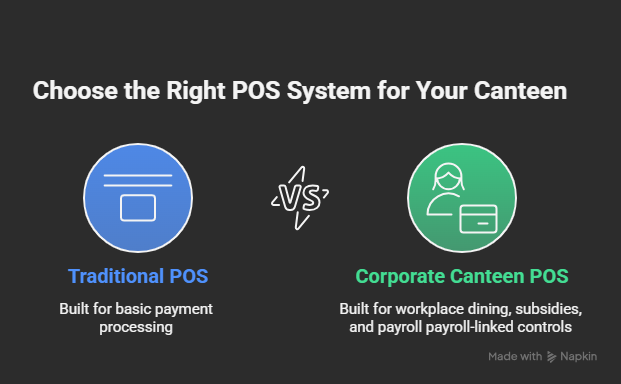
This is where traditional POS solutions fall short — not because they are inadequate, but because they were never designed for corporate environments with subsidies, wallets, or payroll integration.
In South Africa, organisations such as EFRC (Elgin Free Range Chickens), which replaced a paper-slip system with a wallet-linked POS, illustrate how workplace canteens require specialised solutions that integrate payments, HR, payroll, and reporting.
Key Decision Drivers When Choosing a POS System for Your Corporate Canteen
When evaluating POS systems, avoid getting overwhelmed by technical features.. Instead, anchor your decision to these six strategic questions:
1. What payment methods does the POS system actually support?
A modern corporate canteen needs multiple payment types, including:
- Tap-to-pay (Visa/Mastercard debit & credit)
- QR-based payments (like Zapper)
- Closed-loop staff wallet cards
- Mobile wallet app payments
- Employer-funded allowances or subsidies
Without these, your queues remain slow, and your admin burden remains high.
Why this matters in SA:
A significant portion of South African staff may not have bank accounts — particularly in factories, farms, and hospitality environments. A POS must support NFC-enabled staff cards linked to an internal wallet.
2. Can it manage subsidies, allowances, or staff benefits?
This is where corporate canteens differ most from restaurants.
Corporate teams often need:
- Daily or monthly meal allowances
- Fixed or percentage-based subsidies
- Tiered benefits for different roles
- Night shift/weekend rules
- Pre-loaded monthly meal benefits aligned with SARS Code 3801 as used at Radisson Hotel
A standard retail POS cannot handle these rules without extensive customisation.
3. Does it integrate with payroll, HR, and finance systems?
Most South African companies use:
- Sage
- SAP
- Pastel / Sage 300
- Oracle
- Workday / SuccessFactors
A canteen POS system must export or sync:
- Deduction reports
- Allowance usage
- Wallet top-ups
- Staff onboarding/offboarding data
- Fraud flags and anomaly detection
Real-world example:
At EFRC, the POS system integrates with payroll to automatically calculate staff spent and apply deductions monthly — eliminating the historic paper-slip system that took hours to reconcile.
4. Does it support pre-ordering and click-and-collect?
Pre-ordering for:
- Reducing queues
- Supporting large headcounts at peak lunch hours
- Improving kitchen workflow
- Minimising food waste
- Allowing staff to plan their meals in advance
A canteen POS must receive, fulfil, and process these orders in real time.
5. Is it built for multi-site, multi-merchant corporate setups?
Corporate canteens are rarely standalone environments. They often co-exist with:
- A main cafeteria
- Satellite canteens
- Internal shops or tuckshops
- Vending machines
- Pop-up kiosks
- Coffee counters
- Hotel school or training kitchens
A strong POS must support:
- Shared wallets across sites
- Location-specific rules
- Centralised reporting
- Multi-merchant settlements
This ensures consistency while giving each site the visibility it needs.
6. Does the POS system support closed-loop, cashless environments?
Closed-loop wallet systems allow companies to operate independently of banks and card rails.
A closed-loop POS unlocks:
- Remove cash completely
- Ensure compliance
- Provide full traceability
- Simplify reconciliation
- Protect staff who don’t have bank accounts
- Enable spending limits, allowances, and real-time controls
Want to see how a wallet-linked POS works in real time? Explore our Closed-Loop Wallet System or discover how payroll integration with staff wallets streamlines month-end processes.
The Five Essential Features of a Modern Canteen POS System
Once you understand the strategic drivers, focus on these non-negotiable features that deliver operational and financial value.
1. Seamless, Multi-Method Payment Integration
A corporate-ready POS should support:
- Tap-to-pay cards
- QR payments (Zapper)
- Closed-loop staff wallets
- App-based payments
- Employer-funded allowances
This combination reduces friction and ensures that all employees — regardless of their banking status can participate.
2. Advanced Subsidy and Allowance Management
Corporate canteens rely on complex benefit structures.
Your POS must be able:
- Auto-apply subsidies
- Allocate daily/monthly allowances
- Enforce spending caps
- Support tiered rules by department or role
- Handle payroll-led or employer-funded models
- Prevent overspending unless configured otherwise
This ensures both compliance and fairness across your workforce.
3. Real-Time, Cloud-Based Reporting & Dashboards
A powerful reporting system should offer:
- Instant dashboards
- Multi-site visibility
- User-level transaction histories
- Exception reporting
- Detailed export capability
This is essential for cost management, forecasting, and financial accuracy
4. Integrated Inventory and Waste Management
A modern POS should help you:
- Forecast demand
- Optimise menu planning
- Manage portion control
- Detect wastage trends
- Improve supplier ordering
This is particularly valuable in environments producing large meal volumes.
5. Integration With Payroll, HRIS & ERP
This is where Eezipay’s model becomes uniquely powerful.
Linking your POS to staff wallets and payroll allows for:
- Automatic monthly deduction reports
- Real-time balance updates
- Instant deactivation when a staff member leaves
- Automated allowance resets
- Seamless onboarding
👉 Learn more about how automated deductions, allowance resets, and real-time updates work with our Payroll Integration with Staff Wallets
The Eezi Way: Why an Integrated Wallet + POS System Is the Future
A high-performing canteen POS is a great start, but its true power is unlocked when it’s part of a unified ecosystem.
This is the Eezi Way philosophy.
A standalone POS still requires employees to present a card or phone. An integrated system links your POS directly to a central corporate canteen wallet platform, enabling:
- Frictionless payments: Tap your staff card and go.
- Automatic subsidies: Daily/monthly allowances apply instantly.
- Unified reporting: All canteen, vending, and coffee machine spending in one dashboard.
- Pre-ordering: Staff skip queues entirely by ordering via an app.
- Payroll alignment: Deduction or allowance models integrate cleanly.
This ecosystem is exactly what South African organisations such as EFRC and Radisson Hotel use today. At Radisson, for example, staff receive a monthly meal voucher wallet aligned with SARS Code 3801, ensuring tax compliance and enabling accurate monthly reporting without payroll manual work.
Comparing Your Options: Retail POS vs. Corporate Canteen POS vs. Eezipay Smart System
| Feature | Retail POS (e.g., Yoco, iKhokha) | Hospitality POS (Micros, GAAP) | Eezipay Integrated Smart Canteen System |
|---|---|---|---|
| Payment Methods | Card/QR only | Card/QR | Staff wallet, app, NFC card, Zapper, debit/credit, closed-loop |
| Staff Subsidies | ✖ Not supported | Limited | ✔ Fully automated |
| Payroll Integration | ✖ | ✖ Custom only | ✔ Native support |
| Multi-Site Corporate Reporting | ✖ | Limited | ✔ Full corporate visibility |
| Inventory Integration | Basic | Good | ✔ Linked to staff benefits, wallet rules & real-time events |
| Pre-Ordering | ✖ | Optional add-ons | ✔ Built-in ecosystem |
| Staff Without Bank Accounts | ✖ | ✖ | ✔ Fully supported |
| Compliance & Audit Trails | Basic | Good | ✔ End-to-end, wallet-linked |
| Reconciliation | Manual | Partly automated | ✔ Real-time, zero cash |
| SA Corporate Fit | Low | Medium | High — built for local workplace ecosystems |
How to Decide: A Simple Evaluation Framework
As you assess potential systems, consider asking each provider the following:
1. Payments
Does your system accept both open-loop (card/QR) and closed-loop (wallet) payments?
2. Benefits
Can it automate subsidies, allowances, benefit rules and spending limits?
3. Integration
Can it integrate with our payroll, finance, and HR systems without complex custom work?
4. Inclusion
Does it support staff who don’t have bank accounts?
5. Scalability
Is it designed for multi-site use with consolidated reporting?
6. Permissions
Can HR, Finance, and Operations have separate access levels and dashboards?
7. Automation
How much manual reconciliation does it eliminate?
8. Pre-Ordering
Does it support pre-ordering or click-and-collect for peak times?
9. Reporting
Are dashboards real-time, and can they export reports suitable for audit?
This framework ensures you compare vendors on the features that matter most in a workplace setting.
Conclusion: Choose a Strategy, Not a Till
A modern corporate canteen is more than a place where staff buy meals — it’s a critical part of workplace culture, efficiency, and financial control. Choosing the right POS system is therefore a strategic decision, not a technical one.
A generic POS can help you take payments, but a corporate-ready, wallet-integrated POS can:
- Improve staff experience
- Eliminate cash handling
- Automate employee benefits
- Streamline payroll reconciliation
- Reduce waste and inefficiency
- Provide real-time transparency across HR, Finance, and Operations
- Your canteen deserves a system built specifically for the complexity of a workplace environment — not a repurposed retail solution.
Ready to Transform Your Canteen?
Stop letting slow queues, cash handling, and manual reconciliation drain your resources.
Get a tailored POS recommendation based on your workforce, branches, payroll setup, and canteen operations.
👉 Book a demo with Eezipay today and see how a smart, integrated POS and staff wallet system can transform your workplace.